
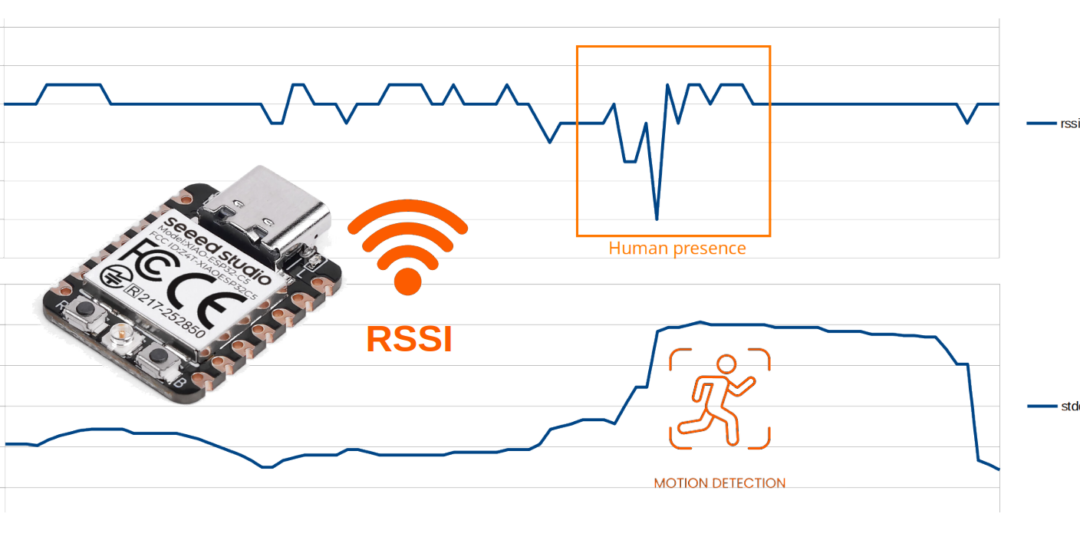
The human body naturally absorbs and reflects radio waves, creating detectable variations in WiFi signal strength. By analyzing these fluctuations, it is possible to detect human presence in a room using a WiFi-enabled device.
In this tutorial I decided to use the XIAO ESP32-C5, a low cost device that supports 5 GHz WiFi. The 5 GHz frequency band is significantly more effective for human presence detection than the traditional 2.4 GHz band, offering higher measurement precision and greater sensitivity to environmental changes, such as movement or occupancy.
Measuring RSSI on ESP32 with Arduino IDE
RSSI (Received Signal Strength Indicator) indicates the strength of the received WiFi signal. As I explain in my article What is… a dBm RSSI is measured in dBm (decibel-milliwatt). Lower values (e.g., -70 dBm) indicate a weaker signal, while higher values (e.g., -30 dBm) indicate a stronger signal.
With the Arduino IDE, retrieving the RSSI value is straightforward using the ESP32’s built-in WiFi.h library, simply call the RSSI() method on the WiFi object.
/**
 * Wi-Fi Received Signal Strength Indicator (RSSI) monitor
 * Using XIAO ESP32-C5 microcontroller
 *
 * Displays the real-time RSSI of the connected Wi-Fi network.
 *
 * https://tutoduino.fr/
 */
#include <WiFi.h>
// ===== WIFI CREDENTIALS =====
const char* ssid = "YOUR_WIFI_SSID";     // Wi-Fi network name (SSID)
const char* password = "YOUR_WIFI_PWD";  // Wi-Fi password
void setup() {
  Serial.begin(115200);
  delay(100);
  WiFi.begin(ssid, password);  // Connect to the Wi-Fi network using the provided credentials
  Serial.print("Waiting for WiFi... ");
  // Wait for the Wi-Fi connection to be established
  while (WiFi.status() != WL_CONNECTED) {
    delay(500);
    Serial.print(".");
  }
  // Connection successful
  Serial.println("");
  Serial.println("WiFi connected");  // Confirm Wi-Fi connection
  Serial.print("IP address: ");       // Display the assigned IP address
  Serial.println(WiFi.localIP());
  Serial.print("RSSI: ");            // Display the initial RSSI value (signal strength)
  Serial.print(WiFi.RSSI());
  Serial.println(" dBm");
}
void loop() {
  delay(1000);  // Wait 1 second between RSSI readings
  Serial.print("RSSI: ");  // Print the current RSSI value
  Serial.print(WiFi.RSSI());
  Serial.println(" dBm");
}Choice of protocol and frequency band for best detection
Optimal human presence detection via RSSI is achieved with 5 GHz band + 802.11n protocol:
- 5 GHz (λ=6cm): Short wavelength → 3x higher RSSI variance vs 2.4 GHz when humans move
- 802.11n: Rich multipath → Strong RSSI fluctuations from body motion
Here is the code to configure the ESP32-C5 accordingly.
/**
 * 5GHz band - 802.11n - 20MHz bandwitdh WiFi configuration for XIAO ESP32-C5
 *
 * https://tutoduino.fr/
 */
#include <WiFi.h>
#include "esp_wifi.h"
// Wi-Fi credentials for target network
const char* ssid = "YOUR_WIFI_SSID";     // Wi-Fi network name (SSID)
const char* password = "YOUR_WIFI_PWD";  // Wi-Fi password
/**
 * Print detailed Wi-Fi error codes with hex, decimal, and symbolic names
 * @param err: ESP-IDF error code
 * @param msg: Descriptive error message
 */
void print_wifi_err(esp_err_t err, const char* msg) {
  Serial.printf("%s: 0x%03X (%d) = %s\n", msg, err, err, esp_err_to_name(err));
}
/**
 * Check and display currently negotiated Wi-Fi protocols after connection
 * Uses esp_wifi_get_protocol() to read bitmap of active 802.11 standards
 */
void check_wifi_protocol() {
  Serial.println("\n--- ACTIVE Wi-Fi PROTOCOLS ---");

  uint8_t protocols;
  esp_err_t rc = esp_wifi_get_protocol(WIFI_IF_STA, &protocols);

  if(rc == ESP_OK) {
    // Decode protocol bitmap (multiple can be active)
    if(protocols & WIFI_PROTOCOL_11B) Serial.println("• 802.11b (2.4GHz legacy)");
    if(protocols & WIFI_PROTOCOL_11G) Serial.println("• 802.11g (2.4GHz)");
    if(protocols & WIFI_PROTOCOL_11N) Serial.println("• 802.11n (2.4+5GHz IDEAL for RSSI detection)");
    if(protocols & WIFI_PROTOCOL_11A) Serial.println("• 802.11a (5GHz legacy)");
    if(protocols & WIFI_PROTOCOL_11AC) Serial.println("• 802.11ac (WiFi 5)");
    if(protocols & WIFI_PROTOCOL_11AX) Serial.println("• 802.11ax (WiFi 6)");
  } else {
    Serial.println("Failed to read active protocols");
  }
}
void setup() {
  Serial.begin(115200);
  delay(1000);
  Serial.println("\nStarting XIAO ESP32-C5 RSSI Monitor...\n");

  // Set Arduino WiFi to station mode
  WiFi.mode(WIFI_STA);

  // Initialize low-level ESP-IDF WiFi stack
  esp_wifi_init(NULL);
  esp_wifi_set_mode(WIFI_MODE_STA);

  // Force 5GHz band only (shorter wavelength = better human detection)
  esp_err_t rc = esp_wifi_set_band_mode(WIFI_BAND_MODE_5G_ONLY);
  if (rc != ESP_OK) {
    print_wifi_err(rc, "Failed to set 5G band mode");
    return;
  }
  Serial.println("5G band mode configured");

  delay(100); // Allow configuration to settle

  // Connect to WiFi
  Serial.print("Connecting to ");
  Serial.print(ssid);
  Serial.print(" ");

  WiFi.begin(ssid, password);

  // Wait for connection with timeout protection
  while (WiFi.status() != WL_CONNECTED) {
    delay(500);
    Serial.print(".");
  }

  // Connection successful - display network info
  Serial.println("\nWiFi connected successfully!");

  // Check negotiated protocols (should show 802.11n for best detection)
  check_wifi_protocol();

  // Display connection details
  Serial.print("IP Address: "); Serial.println(WiFi.localIP());
  Serial.print("Initial RSSI: "); Serial.print(WiFi.RSSI()); Serial.println(" dBm");

  Serial.print("Channel: "); Serial.print(WiFi.channel());
  if (WiFi.channel() >= 36) {
    Serial.println(" (5G)");
  } else {
    Serial.println(" (2.4G)");
  }
}
void loop() {
  // Real-time RSSI monitoring (1Hz sample rate)
  // Higher variance indicates human presence/movement
  delay(1000);
  Serial.print("RSSI: ");
  Serial.print(WiFi.RSSI());
  Serial.println(" dBm");
}
RSSI variation detection
To detect human presence, this project analyzes how Wi-Fi signal strength (RSSI) fluctuates over time.
The standard deviation of RSSI values is computed every second over a 30-second sliding window, which provides a reliable indicator of environmental disturbance caused by human movement.
At startup, the system performs an automatic calibration to learn the “empty room” signal behavior.
The following sequence is executed:
Step 0 — Exit the room (15 s):
A short delay allows you to leave the monitored area so that calibration occurs with no human presence.
Step 1 — Baseline measurement (30 s):
The device records RSSI samples for 30 seconds and computes their mean and standard deviation.
These values define the reference baseline of a stable, empty environment.
Step 2 — Real-time detection:
Every second, the current 30-second RSSI window is analyzed.
If its standard deviation exceeds the baseline by a defined factor (30%), human presence is detected.
/**
 * Wi-Fi RSSI Monitor – XIAO ESP32-C5 (HUMAN PRESENCE DETECTION)
 *
 * Principle:
 * Human movement perturbs Wi-Fi multipath propagation.
 * This increases short-term RSSI variance.
 *
 * Method:
 * 1) 30-second baseline calibration in an empty room
 * 2) Real-time sliding-window RSSI standard deviation
 * 3) Presence detected when variance exceeds calibrated baseline
 *
 * Hardware: Seeed XIAO ESP32-C5
 * Band: 5 GHz, 20 MHz bandwidth
 *
 * https://tutoduino.fr/
 */
#include <WiFi.h>
#include "esp_wifi.h"
// Wi-Fi credentials for target network
const char* ssid = "YOUR_WIFI_SSID";     // Wi-Fi network name (SSID)
const char* password = "YOUR_WIFI_PWD";  // Wi-Fi password
// Sliding window size (seconds = samples at 1 Hz)
#define WINDOW_SIZE 30
// Presence detection sensitivity factor
// Presence declared if stddev > baseline × factor
#define PRESENCE_FACTOR 1.3
// Circular buffer storing last WINDOW_SIZE RSSI samples
int8_t rssi_buffer[WINDOW_SIZE];
int buffer_index = 0;
// Baseline RSSI standard deviation (empty room reference)
float baseline_stddev_rssi = 0;
/**
 * Print ESP-IDF Wi-Fi error with hex, decimal and symbolic name
 */
void print_wifi_err(esp_err_t err, const char* msg) {
  Serial.printf("%s: 0x%03X (%d) = %s\n", msg, err, err, esp_err_to_name(err));
}
/**
 * Display negotiated Wi-Fi PHY protocols after connection
 * Helps verify that 5 GHz / 802.11n/ac/ax is active
 */
void check_wifi_protocol() {
  Serial.println("\n--- ACTIVE Wi-Fi PROTOCOLS ---");
  uint8_t protocols;
  esp_err_t rc = esp_wifi_get_protocol(WIFI_IF_STA, &protocols);
  if (rc == ESP_OK) {
    if (protocols & WIFI_PROTOCOL_11B) Serial.println("• 802.11b");
    if (protocols & WIFI_PROTOCOL_11G) Serial.println("• 802.11g");
    if (protocols & WIFI_PROTOCOL_11N) Serial.println("• 802.11n");
    if (protocols & WIFI_PROTOCOL_11A) Serial.println("• 802.11a");
    if (protocols & WIFI_PROTOCOL_11AC) Serial.println("• 802.11ac");
    if (protocols & WIFI_PROTOCOL_11AX) Serial.println("• 802.11ax");
  } else {
    Serial.println("Failed to read active protocols");
  }
}
/**
 * Collect baseline RSSI in an empty environment (30 s)
 * Fills buffer and computes baseline standard deviation
 */
void calibrate_baseline() {
  Serial.println("\n--- BASELINE CALIBRATION (30 s) ---");
  Serial.println("Room assumed EMPTY – collecting reference RSSI...");
  for (int i = 0; i < WINDOW_SIZE; i++) {
    int8_t rssi = WiFi.RSSI();
    rssi_buffer[i] = rssi;
    Serial.printf("Calib %2d/%2d: RSSI=%d dBm\n",
                  i + 1, WINDOW_SIZE, rssi);
    delay(1000);  // 1 Hz sampling
  }
  baseline_stddev_rssi = calculate_rssi_stddev();
  Serial.printf("Baseline StdDev = %.2f dBm\n",
                baseline_stddev_rssi);
}
/**
 * Compute RSSI standard deviation over buffer
 * Population formula (σ)
 */
float calculate_rssi_stddev() {
  float mean = 0;
  float variance = 0;
  // Mean
  for (int i = 0; i < WINDOW_SIZE; i++) {
    mean += rssi_buffer[i];
  }
  mean /= WINDOW_SIZE;
  // Variance
  for (int i = 0; i < WINDOW_SIZE; i++) {
    float diff = rssi_buffer[i] - mean;
    variance += diff * diff;
  }
  variance /= WINDOW_SIZE;
  return sqrt(variance);
}
/**
 * Compare current RSSI variance with baseline
 * and toggle presence indicator LED
 */
void detect_human_presence(float stddev) {
  if (stddev > baseline_stddev_rssi * PRESENCE_FACTOR) {
    Serial.println("👤 HUMAN PRESENCE DETECTED");
    digitalWrite(LED_BUILTIN, LOW);   // LED ON (active LOW)
  } else {
    digitalWrite(LED_BUILTIN, HIGH);  // LED OFF
  }
}
void setup() {
  Serial.begin(115200);
  delay(1000);
  Serial.println("\nStarting XIAO ESP32-C5 Human Presence Detector...\n");
  pinMode(LED_BUILTIN, OUTPUT);
  digitalWrite(LED_BUILTIN, LOW);  // LED ON during init
  // Configure station mode (required before ESP-IDF Wi-Fi calls)
  WiFi.mode(WIFI_STA);
  // Force 5 GHz band for stronger multipath sensitivity
  esp_err_t rc = esp_wifi_set_band_mode(WIFI_BAND_MODE_5G_ONLY);
  if (rc != ESP_OK) {
    print_wifi_err(rc, "Failed to set 5 GHz band mode");
    return;
  }
  Serial.println("✓ 5 GHz band mode configured");
  delay(100);
  // Connect to access point
  Serial.print("Connecting to ");
  Serial.print(ssid);
  Serial.print(" ");
  WiFi.begin(ssid, password);
  while (WiFi.status() != WL_CONNECTED) {
    delay(500);
    Serial.print(".");
  }
  Serial.println("\n✓ Wi-Fi connected");
  check_wifi_protocol();
  Serial.print("IP: ");
  Serial.println(WiFi.localIP());
  Serial.print("Channel: ");
  Serial.print(WiFi.channel());
  Serial.println(WiFi.channel() >= 36 ? " (5 GHz)" : " (2.4 GHz)");
  // Allow user to leave room before calibration
  Serial.println("Step 0: Leave room (15 s)");
  delay(15000);
  Serial.println("Step 1: Baseline calibration (30 s)");
  calibrate_baseline();
  Serial.println("Step 2: Real-time detection started");
}
void loop() {
  // Acquire RSSI sample at 1 Hz
  int current_rssi = WiFi.RSSI();
  // Insert into circular buffer
  rssi_buffer[buffer_index] = current_rssi;
  buffer_index = (buffer_index + 1) % WINDOW_SIZE;
  delay(1000);
  // Compute variance and detect presence
  float stddev = calculate_rssi_stddev();
  Serial.printf("RSSI: %d dBm ; StdDev: %.3f dBm\n",
                current_rssi, stddev);
  detect_human_presence(stddev);
}Example of RSSI measurements
I did measurements in a 40 m2 room with WiFi access point positioned 10 m from the ESP32-C5 WiFi receiver.
1 – Baseline
Baseline RSSI was measured in an empty room over 30 seconds, yielding a mean of -68.3 dBm and standard deviation of 0.47 dBm.
Calib  1/30: RSSI=-68 dBm
Calib  2/30: RSSI=-68 dBm
Calib  3/30: RSSI=-68 dBm
Calib  4/30: RSSI=-68 dBm
Calib  5/30: RSSI=-69 dBm
Calib  6/30: RSSI=-68 dBm
Calib  7/30: RSSI=-68 dBm
Calib  8/30: RSSI=-68 dBm
Calib  9/30: RSSI=-68 dBm
Calib 10/30: RSSI=-68 dBm
Calib 11/30: RSSI=-68 dBm
Calib 12/30: RSSI=-68 dBm
Calib 13/30: RSSI=-68 dBm
Calib 14/30: RSSI=-68 dBm
Calib 15/30: RSSI=-69 dBm
Calib 16/30: RSSI=-69 dBm
Calib 17/30: RSSI=-68 dBm
Calib 18/30: RSSI=-68 dBm
Calib 19/30: RSSI=-69 dBm
Calib 20/30: RSSI=-69 dBm
Calib 21/30: RSSI=-68 dBm
Calib 22/30: RSSI=-68 dBm
Calib 23/30: RSSI=-69 dBm
Calib 24/30: RSSI=-69 dBm
Calib 25/30: RSSI=-69 dBm
Calib 26/30: RSSI=-68 dBm
Calib 27/30: RSSI=-68 dBm
Calib 28/30: RSSI=-69 dBm
Calib 29/30: RSSI=-69 dBm
Calib 30/30: RSSI=-68 dBm
Baseline RSSI mean = -68.3 dBm
Baseline RSSI standard deviation = 0.47 dBm2 – Empty room
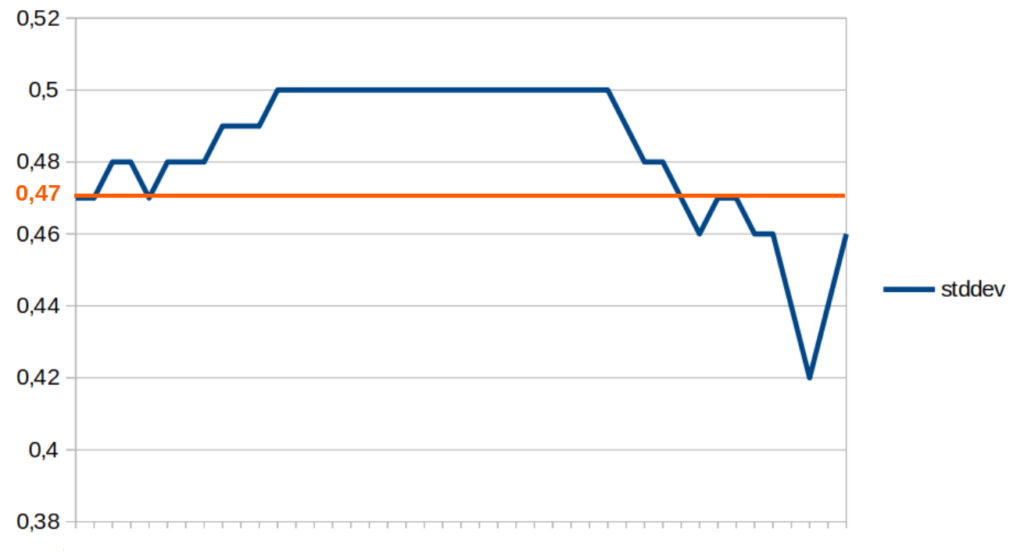
While the room is empty, the RSSI fluctuates between -69 dBm and -68 dBm.
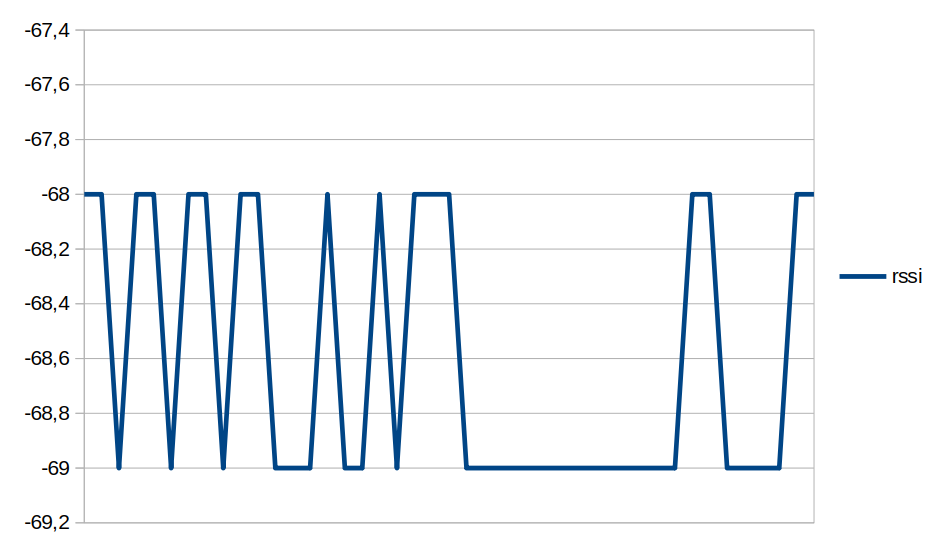
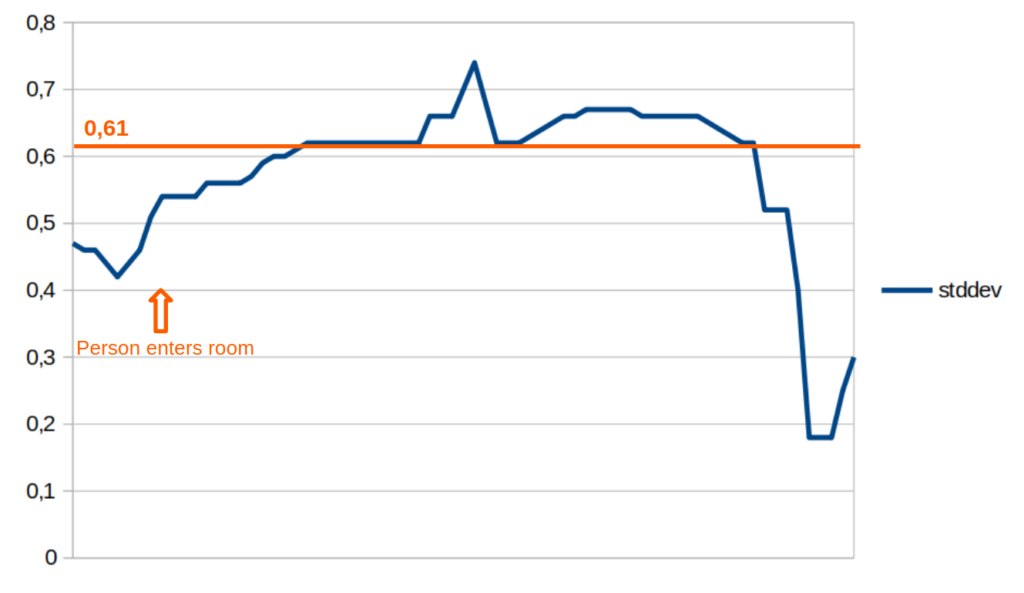
Standard deviation stayed below the 0.61 dBm threshold (130% of 0.47 dBm baseline), fluctuating between 0.42 and 0.50 dBm. No human presence is detected.
3 – Person enters room
When a person enters room, the RSSI fluctuates between -67 dBm and –70 dBm.
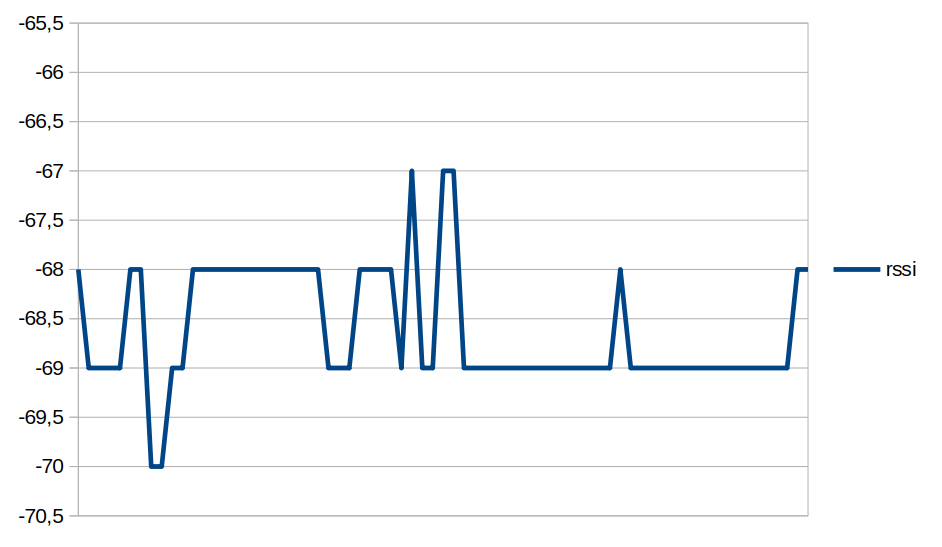
The standard deviation reach 0.61 dBm threshold few seconds after person enters the room. Human presence is detected and remains
In the next example, RSSI and standard deviation are measured as a person enters (t = 25 s) and exits (t = 55 s) room.
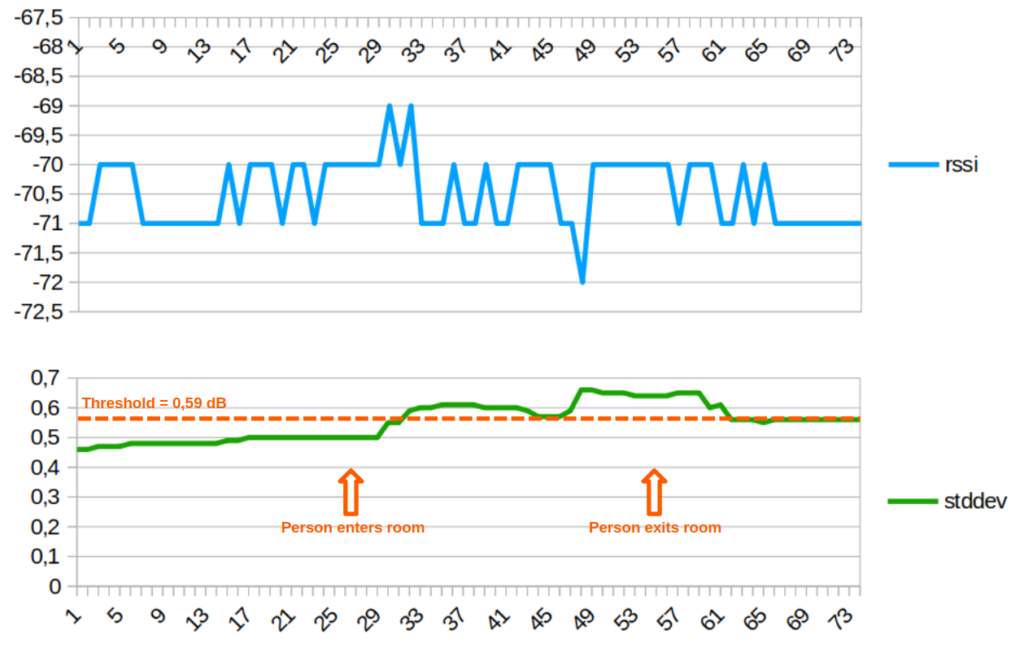
Due to the 30-second sliding window, presence remains detected for 10 seconds after exit. Here, the RSSI standard deviation threshold for presence detection is 0.59 dBm.
I find the results quite interesting, what do you think? I’d love to hear your thoughts, suggestions, or ideas for improvement in the comments section. Thanks!
Hum. Great , did you try to switch on light or cut off fan with it ?
No, but trivial to do.